

A group of email addresses isn't a list it's a pile. A real B2B email list is something you can actually use month after month targeted enough to get responses clean enough to keep your sender reputation safe and organized enough that you're not starting from nothing every time you want to run a campaign. This guide shows how to build one the way from the first choice you make all the way down to the maintenance that most people ignore the part that decides whether a list is still helpful six months, from now or has become useless.
What Makes a B2B Email List Actually Good
Before you start it helps to know what you want to achieve.
A good list should have three qualities that work together. First the list must
be targeted, every contact on it should really fit the person you want to
reach. Second the list must be verified, each address must be confirmed to work
not just guessed. Third the list must be organized, group the contacts, in a
way that makes sense for how you will use them of putting them all in one big
mixed pile. If you miss any of these qualities the list will still exist. It
will not work in that way you expect, when you send to it.
Step 1: Define Who Belongs on the List
Get specific before you collect
a single contact. 'Marketing people' is too broad to build a useful list
around. 'Marketing managers at retail companies with 50 to 200 employees in the
UK' gives you something you can actually filter for and write a relevant
message to. The tighter this definition, the better every later step goes. It's
easy to want to make the list seem larger by changing the definition. When you
make the definition wider it usually leads to fewer people responding. The
message has to try to connect with people all at once and because of that it
ends up being clear, to no one.
Step 2: Choose Your Sources
This part is worth a guide of
its own, which we've already covered in detail: our article on how to find B2B leads walks through
manual research methods and where a lead search tool fits in. The short version
here is that you're either researching contacts by hand, or filtering a
database directly by the criteria you defined in step one.
Step 3: Get Working Email Addresses, Not Guesses
A contact without a reliable
email address doesn't belong on the list yet. If you're building this manually,
our guide on finding business
email addresses covers format guessing and why it needs to be paired with
verification. If you are pulling contacts, from a database look for a
searchable database where verification status is already visible. That way you
will not add verification status step back in yourself.
Step 4: Organize the List, Don't Just Dump Everything Together
A list that has five hundred
contacts all mixed together is more difficult to handle than having five
separate lists with one hundred contacts each. These lists are grouped based on
industry, job role or location. If you divide them on you can create one
message for people in retail marketing and another message for founders, in
healthcare. This way you don't have to use one message that tries to work for
everyone. It also helps with tracking results later. You can see which group
responds better of having one overall number that hides which group is
performing and which is not.
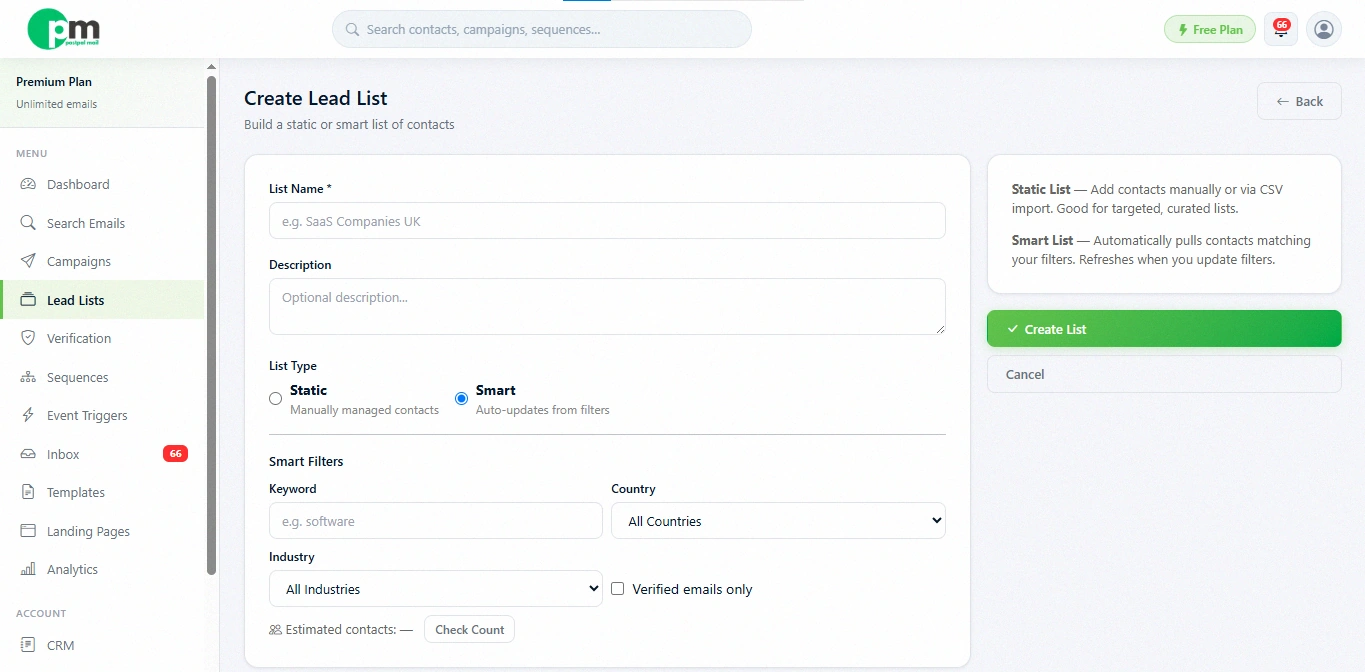
If you want the full breakdown
of list types, our guide on creating
your first Lead List covers the difference between a fixed list you build
once and a list that keeps adding matching contacts on its own.
Step 5: Keep the List Clean Over Time
A list is never really finished. People change jobs companies merge; email formats shift and addresses that worked six months ago begin to bounce. A few habits keep a list healthy long after the list has been built:

●
Remove
bounces immediately because they will not fix themselves on later sends.
●
Honor
unsubscribe requests away both because it is the correct thing to do and
because ignoring them damages the list’s sender reputation.
●
Re‑verify
contacts that have not been emailed in a while before reusing a list.
● Periodically review segments to check they still reflect who you're actually trying to reach
A Quick Comparison, Built Once vs Maintained
|
A List Built Once and Left Alone |
A List That's Actively Maintained |
|
Bounce rate creeps up over time as contacts go stale |
Bounce rate stays low since bad addresses get removed |
|
Segments become outdated as your targeting evolves |
Segments stay relevant to who you're currently targeting |
|
Feels like starting over every few months |
Feels like a resource that keeps compounding in value |
The difference between the two
columns usually comes down to a small amount of recurring effort, checking
bounces after a send, updating a segment when your targeting shifts, rather
than a complete rebuild. Treating list maintenance as an ongoing five-minute
habit rather than an occasional big project tends to be the difference between
the two outcomes above.
Building Your List Inside PostPalMail
This entire process is easier when search, verification and organizing all live in the place. Search on the Search page by keyword, country and industry verify only. Save the results directly into a Lead List. Build the Lead List as a Smart List and Smart List keeps adding matching contacts automatically so the work to keep it up in step five happens largely on its own instead of requiring a manual refresh every quarter.
A Simple Example
Say your target is HR managers
at logistics companies in Germany. Here's the process end to end:
●
Define the audience precisely: HR
managers, logistics industry, Germany
●
Search using those filters,
restricted to verified emails
●
Save the results as a Smart List
called 'Germany Logistics HR', so it keeps growing on its own
●
Check back monthly, removing any
bounces from campaigns you've run and reviewing whether the segment still fits
your targeting
Start Building Your List with PostPalMail
A well-built list is one of the
few marketing assets that keeps paying off long after the initial setup. If
you're ready to build one with verified contacts from the start, create a free PostPalMail account
and put your first Lead List together today.
Disclaimer: This article
is for only information. Should not be considered legal guidance. Always check
that the ways you create your list and reach out to people are in line with the
laws, in the places where your contacts live.